Showing posts with label photography. Show all posts

5.14.2015

Live Event: Scrapbooking Your Pets

If you're a pet owner, drop what you're doing and listen up. Do you scrapbook your pets? Would you like to take better photos of them? How about learn to scrapbook faster?

Did you say yes to at least one of the above?

Then you'll want to join me on Wednesday, May 20 at 1 p.m. EST for “Purrfect Pets: Scrapbooking Our Four-Legged Family Members."


When Lain Ehmann contacted me last fall and asked me to be a featured guest for one of her monthly scrapinars, I said sign me up! My topic, scrapbooking your pets. And I have plenty of experience with that!


Cat scrapbook pages:


A couple recent digital scrapbook layouts using PicsArt:


And so many more pet scrapbook pages!

I've taken hundreds of photos of my pets over the years and share the best ones on Instagram.


You'll learn my pet photography tips, watch how I scrapbook my four-legged friends in a fast, eco-friendly way, and more! Here are a few sneak peeks:


Click here to sign up for this FREE scrapinar and if you can't make it on May 20, there will be a replay available right after. Hope to see you there! ~Danielle

Related:

Pet Memorial Scrapbook: The First & Last Pages
A Very Recycled Scrapbook Page
A Build-A-Bear Doppelganger Says Boo!

7.31.2013

Scrapbook Comparison: 2005 vs. 2012

Scrapbooking has come a long way, especially the way I scrapbook. If you've dug into my history, you probably read that I completed my first scrapbook at the age of four, but didn't start "modern" scrapbooking until I became of mom in 2002.

I was a chronological scrapbooker during those early years as a mother and scrapbooked almost every single photo (and back then, most of us were still using 35mm film). I did the big 12x12 albums by Creative Memories too and couldn't start another year's scrapbook without finishing the one I was working on.

Fast forward to present time and I've grown as a scrapbooker. I like to mix things up and with two children, plus a digital camera AND camera phone that get plenty of use, I simply don't have time to scrapbook chronologically or include most of the photos I take.

Traditional (and eco-friendly) paper scrapbooking is still where my heart is, but I've definitely utilized today's photo book options to include more photos, cut down on my scrapbooking time and save money. I only print my favorite photos and if I get around to scrapbooking them in my craft room, super! Otherwise, they're scrapbooked (with titles, journaling and embellishments) in the photo books I create. And if something happens to my photo books, most of them can easily be reordered, unlike the traditional albums that took hours to create.

Let's compare two of my scrapbooks! One is a 12x12 album from 2012 and the other is a photo book I created earlier this year from my 2012 photos.

Comparing Traditional Scrapbooks to Photo Books

These numbers were surprising! Yes, there's an obvious difference in size, but I didn't realize that both scrapbooks had about the same amount of pages. And I practically doubled the amount of photos in the 2012 album! (Thanks to digital, I take A LOT more photos!) Time and cost are huge factors in why I choose photo books for my yearly albums, as well as vacations and birthdays.

Time for the 2005 scrapbook included ordering prints, shopping for paper and embellishments and the amount of time I spent scrapbooking. For the 2012 photo book, I didn't have to shop, but time included editing photos, adjusting layouts, adding digital embellishments and journaling.

The cost for a traditional scrapbook included the album itself, pages, page protectors, adhesive, photo developing, paper and embellishments. On the other hand, the photo book cost included the book, additional pages (beyond 20 pages), shipping and tax, plus I was able to use a couple discounts and saved even more money (already figured in the cost above).

My biggest complaint about photo books and digital scrapbooking is that I have to spend extra time on the computer. I love playing in my craft room and getting creative, which is why I won't stop traditional paper scrapbooking anytime soon.

What are your thoughts? ~Danielle

Related:

Are You an EcoScrapbooker?
We can change how we scrapbook (so we don't look like this in the future)
Digital Scrapbooking: Camping at the KOA

6.12.2013

Digital Scrapbooking: 4 Simple & Quick Pages

When I first became a mom, I scrapbooked every single 4x6 photo I took and printed. This was over a decade ago and before I even owned a digital camera. For my oldest daughter's first birthday, I filled an entire 8.5x11 scrapbook with tons of memorabilia, photos and included all of her cards. By the time I had my second child, birthday scrapbooks became easier, less time consuming and more cost effective by creating photo books.

I recently ordered a photo book for my youngest little lady after celebrating her 5th birthday. I like to mix things up by creating digital scrapbook pages on my phone, computer and by using the online software made available via Shutterfly.

Here are four simple and quick digital pages I created just for that photo book:

"Bounce" Digital Scrapbook Layout using Pics Art app (Android).

"What? Do I Look Like Trouble?" Digital Scrapbook Layout using My Memories Suite.

"Look Who's 5" Digital Scrapbook Layout using My Memories Suite.

"Happy Birthday" Digital Scrapbook Layout using My Memories Suite.

I added these pages to the photo book, included plenty of other photos and journaling while I customized the pages to fit my style. An easy peasy time-saver! 

Do you create photo books too? Share your thoughts in the comments below. ~Danielle

Related:

Digital Scrapbooking: Highlights from the Birthday Scrapbook
Digital Scrapbooking: Camping at the KOA
Digital Scrapbooking with Picasa

2.27.2013

My 2012 Take Twelve Scrapbook is Complete!

Last year's Take Twelve is finally done! One of my goals for February's Layout a Day was to finish scrapbooking the photos I took last year on the 12th day of each month. Before the month began, I had only scrapbooked January to May. I'm happy to share the rest of the year:


June Take Twelve LOAD213 Day 25


July 2012 Take Twelve LOAD213 Day 7


August Take 12 LOAD213 Day 17


Take Twelve September 2012 LOAD213 Day 4


October Take Twelve LOAD213 Day 24


November Take Twelve LOAD213 Day 24

December Take Twelve LOAD213 Day 26

You can view the entire set on my Flickr page and see the blog post that started it all here.

Did you participate in Ella Publishing's Take Twelve or something similar? If so, have you finished scrapbooking your photos? ~Danielle

1.30.2013

Valentine's Day Tutorial: Coaster Scrapbook


This little coaster scrapbook represents the early years of my relationship with my husband. I've called it Pics From The Vault since the majority of photos have never been shown to our children...until now. 

Many of the photos were taken while we were still dating at the end of 1999 and into 2000. To make them look like Instagram prints, I photographed the originals and downloaded them to my computer. Using Picasa, I cropped the photos into squares, added a black and white filter, along with the Holga-ish filter and printed them at Shutterfly (click here for my Instagram-printing tutorial).

Let's have a look inside:


I purged supplies from my stash, used a coaster book from Maya Road and my trusty Glue Dots®. The love-themed Fancy Pants cardstock and journal pages from BoBunny were purchased a few years ago, so I'm happy to see these finally get used (especially the cardstock with two blue birds). Here's how I made it:

Supplies:

Glue Dots® (Micro, Lines, Ultra-Thin)
Maya Road coaster book
Fancy Pants cardstock
BoBunny journal pages
Basic Grey stickers
Prima flower
StazOn black ink
small hole punch
square photos
white cardstock
paper trimmer

1. Remove chain from coasters and set aside. 
Trim cardstock to fit coasters and attach using Glue Dots Glue Lines®. 

 
2. Punch holes into cardstock for chain.


3. Decorate the coaster book with journal pages, photos and embellishments. 
Adhere decorations to book using Ultra-Thin and Micro Glue Dots®.


4. Ink the edges of the coaster book pages.


5. Type journaling on word processor, print on white cardstock and use paper trimmer to cut the lines into strips. Use Glue Dots Glue Lines® to attach the word strips to the coaster scrapbook.


6. Insert chain back through coaster scrapbook and secure clasp.

After I was done, I excitedly shared this coaster book with my girls and hubby. It feels great to finally document these photos and dig deep into my scrapbooking stash for a little purging.

What supplies have you been holding onto for too long? ~Danielle

Related:

12.26.2012

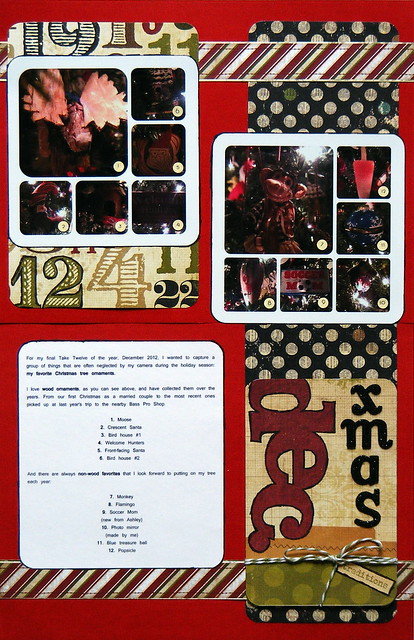
Take Twelve: December

For my final Take Twelve of the year, I wanted to capture a group of things that are often neglected by my camera during the holiday season: my favorite Christmas tree ornaments.

I love wood ornaments, as you can see here:

6 of My Favorite Wood Ornaments

And there are always favorites that I look forward to putting on my tree each year, including the newest one pictured in the collage below, Soccer Mom:

6 of My Favorite Non-Wood Ornaments

Today is the final post of 2012. Thanks for your continued support and I'll see you in 2013! Happy Holidays! ~Danielle

Want more Take Twelve posts? See them here:
 
August
September 
October 
November

11.14.2012

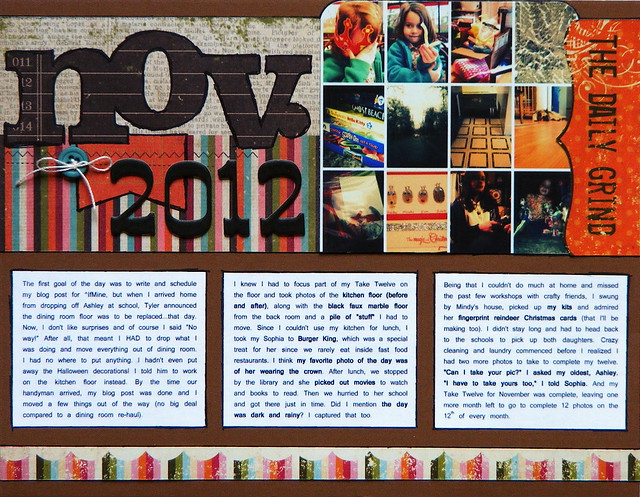
Take Twelve: November


With Monday still fresh in my mind, here's the story of my November Take Twelve...

The first goal of the day was to write and schedule my blog post for ^IfMine, but when I arrived home from dropping off my oldest daughter at school, the hubby announced the dining room floor was to be replaced...that day. 

Now, I don't like surprises and of course I said "No way!" After all, that meant I HAD to drop what I was doing and move everything out of dining room (including handfuls of my scrapbooks and stacks of books). I had no where to put anything. I hadn't even put away the Halloween decorations! I told him to work on the kitchen floor instead.

By the time our handyman arrived, my blog post was done and I had to move a few things out of the way, which was no big deal compared to a dining room re-haul. I knew I had to focus part of my Take Twelve on the floor and took photos of the kitchen floor (before and after), along with the black faux marble floor from the back room and a pile of "stuff" I had to move.

Since I couldn't use my kitchen for lunch, I took my youngest daughter to Burger King, which was a special treat for her since we rarely eat inside fast food restaurants. I think my favorite photo of the day was of her wearing the crown.

After lunch, we stopped by the library and she picked out movies to watch and books to read. Then we hurried to her school and got there just in time. Did I mention the day was dark and rainy? I captured that too.

Being that I couldn't do much at home and missed the past few workshops with crafty friends, I swung by Mindy's house, picked up my kits and admired her fingerprint reindeer Christmas cards (that I'll be making too).

I didn't stay long and had to head back to the schools to pick up both daughters. Crazy cleaning and laundry commenced before I realized I had two more photos to take to complete my twelve. "Can I take your pic?" I asked my oldest. "I have to take yours too," I told my youngest. And my Take Twelve for November is complete. Any questions? ~Danielle

Want more Take Twelve posts? See them here:
 
August
September 
October

MTC3WHMNGQC8

11.07.2012

How to Print Instagram Photos

Last week, I shared my Instagramed Week in the Life Project. Today, I'd like to show you how I printed my Instagram photos on Shutterfly. 

After transferring the photos from my phone to my computer and then to Shutterfly, I chose the prints I wanted to order and went to the Cart page. I clicked Preview:


And then Adjust cropping:


I chose the Custom crop tool:


to create a square photo:


I chose the Free option to print the square Instagram photo as a 4x6 print.


Back on the Cart page, I was able to review the print to make sure the image fit the space perfectly and wasn't cut off. I had to do this for every Instagram photo - a bit tedious, but worth it.

I placed my order and waited for the bright orange package to arrive. Once it did, I cropped each Instagram photo, leaving a white border around each:


 and stamped on the photo scraps to use them throughout the project:


Read more about my Instagramed Week in the Life Project here and view all the scrapbook layouts on Flickr. 

How do you print your Instagram photos? ~Danielle

Note: I have no affiliation with Shutterfly, but I do utilize their annual print plan so I only have to pay 10 cents per photo and receive a free photo book each year.

Related:


10.24.2012

Take Twelve: October

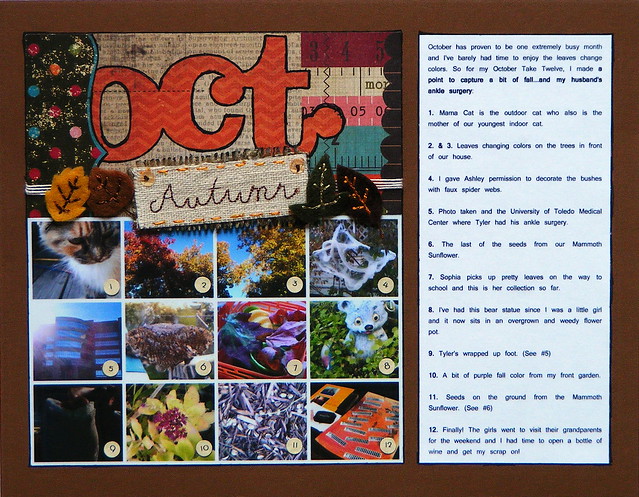
October has proven to be one extremely busy month and I've barely had time to enjoy the leaves change colors. So for my October Take Twelve, I made a point to capture a bit of fall...and my husband's ankle surgery:


1. Mama Cat is the outdoor cat who also is the mother of our youngest indoor cat.

2. & 3. Leaves changing colors on the trees in front of our house.

4. I gave my oldest daughter permission to decorate the bushes with faux spider webs.

5. Photo taken and the University of Toledo Medical Center where my husband had his ankle surgery.

6. The last of the seeds from our Mammoth Sunflower.

7. My youngest picks up pretty leaves on the way to school and this is her collection so far.

8. I've had this bear statue since I was a little girl and it now sits in an overgrown and weedy flower pot.

9. My husband's wrapped up foot. (See #5)

10. A bit of purple fall color from my front garden.

11. Seeds on the ground from the Mammoth Sunflower. (See #6)

12. Finally! The girls went to visit their grandparents for the weekend and I had time to open a bottle of wine and get my scrap on! (See finished layout here.) ~Danielle

Related Take Twelve Posts:

August
September

10.09.2012

Almost Never Clever's Cell Phone Photo Blog Hop

When was the last time you transferred photos from your cell phone to your computer or saved copies of them on some sort of photo sharing site (besides Instagram)?

Almost Never Clever's Cell Phone Blog Hop is here to remind you...It's time to organize your cell phone pics!


Here's the list of participating cell phone photo-takers:

Start Here--> Nat: Almost Never Clever
Mariah: Its Fun2Scrap
You're Here--> Danielle: EcoScrapbook
Next Stop--> Jen: Down Home South Jersey


You may remember photos from the last cell phone photo blog hop. Today, I'm celebrating photos from the 3rd quarter of the year, July through September. After deleting the bad photos, I ended up with 436 cell phone photos and this number doesn't include the ones I took for craft tutorials.

July (161 photos)


Smack dab in the middle of summer, I was juggling too many activities and events to count. The photos above were taken at a friend's wedding, the day my youngest daughter started her summer dance class, during a trip to the zoo, in Chicago when I took the Zutter Certification Course, at soccer camp with my oldest daughter and Mia Hamm...and I even had time to stop and smell photograph a mammoth sunflower in our backyard. Also see: July's Take Twelve.

August (173 photos)


By the time we got to the end of August, I couldn't believe how fast summer flew by. The girls, my mother-in-law and I traveled south to Cincinnati for a trip to Kings Island and the only camera I brought was my cell phone. I ended up printing the photos as collages (like this one on Instagram) and added them to my "Road Trip" scrapbook. Other fun stuff: a cutie-pie four-year-old, a 4th graders first day of school, filming for a Toledo Zoo commercial and raising ladybugs. Also see: August's Take Twelve.

September (102 photos)


September began the busy season, one busier than all the Septembers before since I started my new job, but we survived. Preschool started. Dance started (even though she doesn't seem happy about it). Soccer started. I put a fake mustache on my hubby around the same time his favorite fish died so we he had to buy more. We went to the zoo (again) and I snapped a close-up of an armadillo...and still managed to take in a sunset from my back window and admire a butterfly at a pumpkin farm. Also see: September's Take Twelve.

So that's a snippet of my life from July, August and September. Now it's time to see Jen's view of the world. Thanks for stopping by! ~Danielle

8.14.2012

12 Favorite Children's Books to Read Aloud

Reading aloud with children is known to be the single most important activity for building the knowledge and skills they will eventually require for learning to read. ~Marilyn Jager Adams

12 Favorite Children's Books to Read Aloud

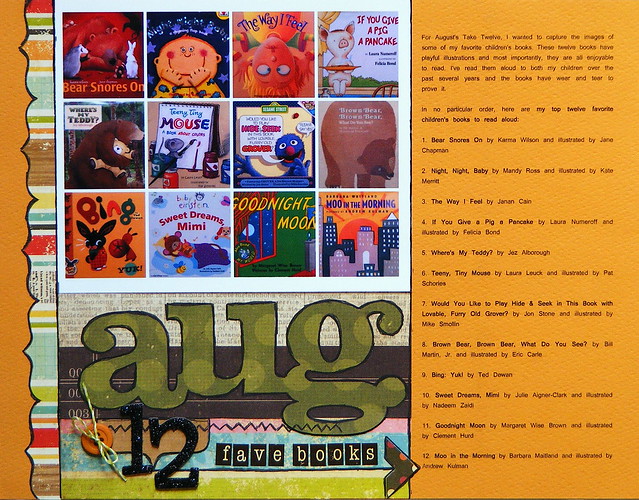
For August's Take Twelve, I wanted to capture the images of some of my favorite children's books. These twelve books have playful illustrations and most importantly, they are all enjoyable to read. I've read them aloud to both my children over the past several years and the books have wear and tear to prove it.

In no particular order, here are my top twelve favorite children's books to read aloud:

1. Bear Snores On by Karma Wilson and illustrated by Jane Chapman

2. Night, Night, Baby by Mandy Ross and illustrated by Kate Merritt

3. The Way I Feel by Janan Cain

4. If You Give a Pig a Pancake by Laura Numeroff and illustrated by Felicia Bond

5. Where's My Teddy? by Jez Alborough

6. Teeny, Tiny Mouse by Laura Leuck and illustrated by Pat Schories

7. Would You Like to Play Hide & Seek in This Book with Lovable, Furry Old Grover? by Jon Stone and illustrated by Mike Smollin

8. Brown Bear, Brown Bear, What Do You See? by Bill Martin, Jr. and illustrated by Eric Carle

9. Bing: Yuk! by Ted Dewan

10. Sweet Dreams, Mimi by Julie Aigner-Clark and illustrated by Nadeem Zaidi

11. Goodnight Moon by Margaret Wise Brown and illustrated by Clement Hurd

12. Moo in the Morning by Barbara Maitland and illustrated by Andrew Kulman

What's your favorite book to read aloud? ~Danielle

This year's Take Twelve posts:


Also see: Tips for nurturing reading in young children (written by me)

Quote source: Reading Rockets

7.18.2012

Take Twelve: July 2012

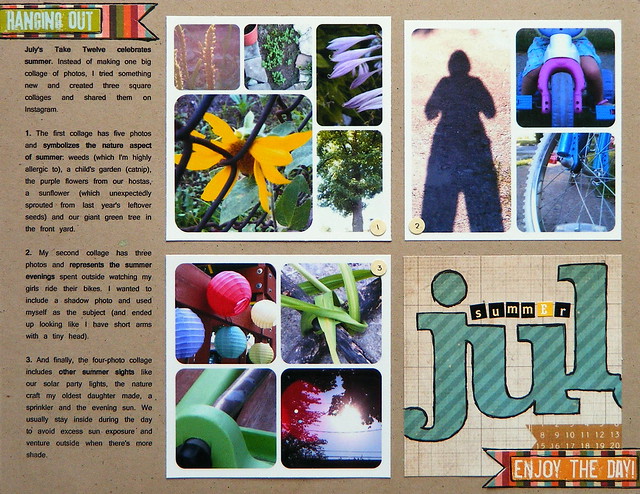
Are you enjoying summer? I sure am! I recently drove out to Chicago for a pre-CHA course and I am now a Zutter Certified Instructor! All the details about that, along with photos and projects will be in an upcoming post. Today's post is about Ella Publishing's Take Twelve Challenge.

Last Thursday, I took twelve photos that celebrate summer and I tried something new. Instead of making one big collage of photos, I created three square collages and will print them as 4x6 photos for my scrapbook layout.

The first collage has three photos and represents the summer evenings spent outside watching my girls ride their bikes. I wanted to include a shadow photo and used myself as the subject (and ended up looking like I have short arms with a tiny head).


This next four-photo collage includes other summer sights like our solar party lights, the nature craft my oldest daughter made, a sprinkler and the evening sun. We usually stay inside during the day to avoid excess sun exposure and venture outside when there's more shade.


My final collage has five photos and symbolizes the nature aspect of summer: weeds (which I'm highly allergic to), a child's garden (catnip), the purple flowers from our hostas, a sunflower (which unexpectedly sprouted from last year's leftover seeds) and our green giant tree in the front yard.


Now, since it is summer and I've been busy with crafty classes, crazy kids and mini-vacations, I haven't had a chance to scrapbook and the reason why I don't have June's Take Twelve layout ready to share.

This blog is about eco-friendly scrapbooking and I feel that I'm not representing that as well as I would like to. I have a couple things in the works right now and once school starts, I plan to get back to the roots of my blog and bombard you with all things ecoscrapbooking. Until then, keep on enjoying your summer! ~Danielle

This year's Take Twelve posts:

7.10.2012

What's On Your Cell Phone?

When was the last time you organized your cell phone photos? Nowadays, most photos I snap and share are from my cell phone. Are you the same way? If so, this blog hop is for you!


Natalie of Almost Never Clever wants to know what's on your cell phone?

Earlier in the year, Nat gave blog readers a peek into her life when she shared her cell phone photos. Now that the second quarter of the year has passed, she's invited us to do the same.

Where it starts--> Nat: Almost Never Clever
You're here--> Danielle: EcoScrapbook
Next stop--> Jessica: Sweet 'N' Scrappy
Mariah: Its Fun2Scrap

I don't have a regular routine, but every couple months or so, I transfer my most recent cell phone pics to my computer, edit them in Picasa and upload all of them to Shutterfly for safe-keeping. Once the photos have been organized into monthly folders on both my computer and online, I start deleting them from my phone.

Let's have a look at some of my cell phone photos...

April:

In April's folder, there are 279 photos. It's probably my most favorite month of the year since we have my birthday, Earth Day, Easter and the first signs of spring all rolled up into one fine month. We spent the majority of our time remodeling our kitchen (still a work-in-progress) and another highlight was when Instagram finally came to Android.
 

Week in the Life also took place during April and it just so happened to be a pretty fabulous one since I scrapbooked on the news! I was happy to transfer these photos to my computer so I can (eventually) create my Week in the Life digi-layouts. I'll be referring to my captions on Instagram for most of the journaling.


May:

May was hectic with continued kitchen work, my 4-year-old's birthday party, a weekend camping trip and Layout A Day. I survived though, took over 400 photos and even made it to the zoo!


You can see more photos of May here (digital birthday layouts) and here (May's Take Twelve).

June:

June is still fresh in my mind and ended with 330 saved photos. I was busy taking photos of blooms, baby birds and my beautiful little girls. First up, a few flowers from my garden:


The last week of the month, my oldest daughter went to Girl Scout camp during the day at a nearby park and I had plenty of chances to photograph the scenery. The largest and smallest photos below were taken in the middle of the Maumee River where we were able to cross to the other side without getting wet. We weren't able to do that this time last year.


The neatest part about June was the robin's nest right outside my back window. Once I spotted the neatly-woven nest with little blue eggs, I was a photo-taking maniac from June 4th until the last baby bird left on the 28th. It was so exciting to see these four robins grow extremely fast and eventually learn how to fly out of their nest.


June is over, the baby birds are gone and I'm ready to take several hundred more photos during the third quarter of the year. Nat has a pretty good photo organization system going on and I plan on sharing more cell phone photos in October. 

Now it's time to hop on over to Jessica's blog to see her picture-taking display.

Thanks for stopping by! ~Danielle